
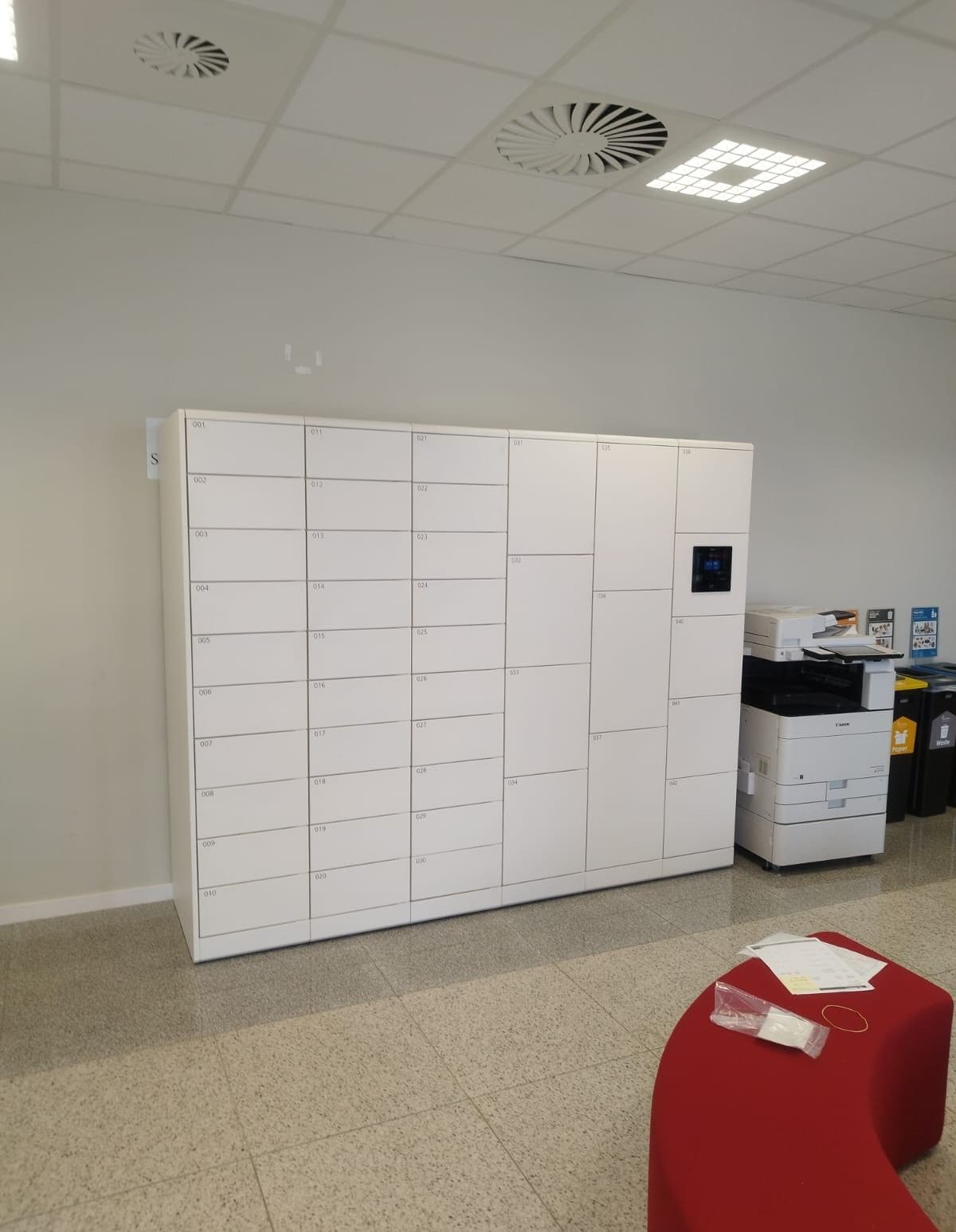
Office package volumes have changed faster than most workplace operations models. Employees receive personal deliveries at work, IT teams ship replacement devices between sites, vendors drop maintenance parts during the day, and reception teams still need to keep the front desk moving.
In many offices, package handling remains a manual process. Packages are dropped at reception or a shared mailroom corner, staff send ad hoc notifications, and pickup confirmation depends on memory or spreadsheet updates. That process works at low volume. It creates friction and risk at enterprise scale.
This guide explains where workplace package management breaks down, what a smart locker operating model looks like in practice, and how enterprise teams can deploy it without adding administrative burden.
For teams evaluating production-ready options, Keynius provides Corporate Workspace solutions, Personal & Staff Storage, Asset & Equipment Management, and Parcel workflows.
Quick answer: what improves workplace package management?
The most reliable model combines:
- secure self-service package lockers near core circulation zones
- time-bound access credentials for each pickup event
- digital chain-of-custody logs for delivery, access, and exceptions
- standardized policy and escalation rules across teams
That model reduces manual handoffs while improving control, visibility, and employee pickup experience.
Quick answers for office mailroom management teams
What is workplace package management in practice?
It is the operational system for receiving, securing, notifying, and releasing office packages with clear custody evidence and minimal manual handovers.
How do smart lockers improve office package management?
They combine controlled self-service pickup, automated notifications, and digital event logs so teams can reduce handling workload while improving accountability.
What should enterprise teams implement first?
Start with policy design and baseline metrics, then deploy locker capacity in the highest-friction zones and expand in controlled rollout phases.
What the problem looks like in real workplace package management operations
Delivery flow is bursty, not linear
Most offices do not receive parcels at a steady rate. Inbound volume spikes around courier windows, project milestones, procurement cycles, and return-to-office peaks. Reception teams then handle identity checks, visitor processing, and package intake at the same time.
Manual notification cycles create delays
When teams rely on email or chat notifications, pickup timing becomes inconsistent. Packages stay unclaimed longer, storage space fills unevenly, and staff spend time chasing recipients.
No single source of truth for custody
In manual setups, chain-of-custody evidence is often fragmented across notes, inboxes, and individual memory. If an item is misplaced or retrieved by the wrong person, incident resolution becomes slow and uncertain.
Package workflows are cross-functional but unmanaged
Facilities, reception, IT, security, and workplace experience teams all touch package workflows, but ownership is often unclear. Without a shared operating model, rules vary by shift and by building.
Why the problem occurs
Package handling is treated as a side task
Many offices optimize front-of-house for access and visitor processing, not parcel operations. Package intake becomes an exception flow layered onto already busy teams.
Storage space was not designed for volume variability
Packages get staged in ad hoc areas that were never designed for secure temporary custody. Overflow behavior then becomes reactive rather than policy-based.
Policy design lags volume growth
Offices often lack clear rules for:
- maximum dwell time
- oversized item handling
- ID verification at pickup
- escalation for uncollected packages
- after-hours access windows
When policy is unclear, operational outcomes depend on individual staff judgment.
Business impact of weak workplace package management
Higher handling workload and interruption cost
Reception and workplace teams spend time on repeated low-value steps: intake confirmation, manual alerts, item retrieval, and dispute follow-up.
Security and compliance risk
Unstructured storage reduces control over who can access what, when, and under which conditions. Weak custody evidence creates avoidable risk in incident investigations.
Poor employee and tenant experience
When pickup location or status is unclear, people lose time searching for packages and contacting support teams.
Hidden real-estate inefficiency
Package overflow areas consume front-of-house or back-of-house space that could be used for higher-value workplace functions.
Common office package management approaches organizations try
Reception desk handover
Pros:
- easy to start
- no infrastructure change
Limitations:
- high recurring labor load
- weak scalability
- inconsistent custody controls
Shared package room with manual access
Pros:
- centralizes package location
- reduces visible desk clutter
Limitations:
- access control can remain weak
- audit trails are often incomplete
- bottlenecks shift to keyholders or support staff
Mailroom software without controlled pickup hardware
Pros:
- improves notification and package logging
- introduces some process structure
Limitations:
- pickup events may still rely on unmanaged handovers
- custody risk remains when physical access is not controlled
Comparison matrix: reception vs package room vs smart lockers
Reception handover
- Security control: Low to medium
- Labor intensity: High
- Auditability: Low
- Scalability: Low
- Pickup experience: Medium
Shared package room
- Security control: Medium
- Labor intensity: Medium to high
- Auditability: Low to medium
- Scalability: Medium
- Pickup experience: Medium
Smart locker workflow
- Security control: High
- Labor intensity: Low to medium
- Auditability: High
- Scalability: High
- Pickup experience: High
Where smart lockers fit
Smart lockers move package workflows from manual custody to policy-driven self-service.
Controlled access per parcel event
Each delivery is associated with a specific compartment and authorized recipient. Access can be time-bound, credential-bound, and revocable.
Digital custody trail
Every key event is logged:
- delivery timestamp
- recipient notification
- pickup timestamp
- exception actions and overrides
Faster pickup with fewer staff interventions
Recipients collect packages directly from assigned compartments, which reduces service queue pressure and repeated manual handling.
Standardized rules across sites
Policies can be configured consistently across buildings while preserving local operational exceptions where needed.
Implementation considerations for enterprise package management teams
1. Map package journeys before selecting hardware
Define inbound streams first:
- employee personal deliveries
- IT asset shipments
- vendor and contractor deliveries
- inter-office transfers
Compartment mix and placement should follow workflow data, not aesthetics alone.
2. Define access and identity model
Set rules for:
- recipient authentication method
- temporary access expiry
- delegated pickup policy
- staff override permissions
Access logic should align with existing workplace identity and governance policies.
3. Design for supervised convenience
Place lockers where pickup is easy but still operationally observable. Good placement balances throughput, security, and user experience.
4. Establish escalation pathways
Document procedures for:
- unclaimed packages
- damaged or suspicious parcels
- wrong-recipient events
- out-of-hours exceptions
Escalation should be explicit across Facilities, Security, and IT.
5. Build an ownership model
A practical split often looks like (and should be documented before go-live):
- Facilities: location strategy, physical operations, capacity planning
- Security: policy, access controls, incident governance
- IT: systems administration, integrations, identity workflows
- Workplace Experience/Reception: day-to-day exception handling and user guidance
30/60/90 rollout timeline for package management software and lockers
First 30 days: diagnose and design
- map inbound package journeys by location and user type
- define policy rules for access, dwell time, and exceptions
- establish baseline metrics for workload and exception rate
Days 31 to 60: pilot controlled workflow
- launch in one or two high-friction zones
- train reception, facilities, and security teams on exception handling
- validate notification timing, pickup SLA, and escalation reliability
Days 61 to 90: scale with governance
- expand to additional buildings or floors based on pilot metrics
- standardize admin roles and permissions across sites
- finalize dashboard reporting cadence for operations and leadership
When smart lockers are not the right first move
Smart lockers are usually the right long-term model, but not always the first project step. Teams should first fix core gaps if they currently lack:
- a clear owner for package policy and exception decisions
- a reliable recipient directory or identity process
- basic incident escalation definitions for suspicious or unclaimed items
Without these foundations, new hardware can inherit old process problems. In those cases, establish minimum governance first, then deploy lockers in phased waves.
Performance benchmark targets (before vs after rollout)
Delivery-to-notification time: baseline 30 to 180 min; target under 10 min.
Notification-to-pickup median: baseline 4 to 24 hours; target under 2 hours.
Manual interventions per 100 deliveries: baseline 25 to 55; target under 10.
Retrieval disputes per 1,000 deliveries: baseline 8 to 20; target under 4.
Aged packages over 72 hours: baseline 10% to 30%; target under 8%.
KPI framework to measure success
Track these indicators from baseline to post-rollout:
- average time from delivery to recipient notification
- average time from notification to pickup
- number of manual staff interventions per 100 deliveries
- package dwell-time distribution (including aged inventory)
- retrieval dispute or exception rate
- occupancy/utilization by locker bank and timeslot
These metrics help teams decide where to rebalance capacity, adjust policy, or improve communication.
Evidence from Keynius enterprise deployments
Enterprise teams often ask whether controlled locker workflows can scale without adding complexity. Keynius deployments provide practical examples:
- In a global corporate workspace deployment for Air France-KLM, Keynius implemented 2,200 locker walls and supported more than 20,000 weekly uses with reported time savings through remote administration: case study.
- In a high-security public workplace environment, Brussels Police centralized access management across 2,800 smart lockers including office use cases: case study.
These examples show that storage governance, access control, and administrative consistency can be standardized across complex organizations.
Best environments for this solution
Smart-locker-based package management is especially effective in:
- multi-tenant office campuses with high daily parcel variability
- enterprise headquarters with shared desk and hybrid attendance patterns
- regulated or high-security workplaces requiring stronger custody evidence
- multi-site organizations that need standardized policy and reporting
FAQ: workplace package management
What is workplace package management?
Workplace package management is the process for receiving, securing, notifying, and releasing inbound parcels in office environments with clear accountability and minimal manual friction.
How do smart lockers reduce mailroom workload?
They replace repeated handoffs with controlled self-service pickup, automate recipient notifications, and reduce interruption-heavy retrieval tasks for reception and workplace teams.
Why is chain-of-custody important for office packages?
Chain-of-custody records provide traceable evidence of who handled a package and when, which supports incident response, compliance, and operational trust.
Can this work in hybrid workplaces?
Yes. Hybrid patterns increase timing variability for pickups, which makes time-bound notifications, controlled access, and auditable logs more important.
What should teams measure first after rollout?
Start with pickup lead time, manual intervention rate, aged package count, and exception rate. These indicators show whether the new model is reducing both workload and risk.
Conclusion
Workplace package management is no longer a minor mailroom task. In enterprise offices, it is an operational system that affects reception flow, security posture, employee experience, and administrative efficiency.
Smart lockers improve this system when they are deployed as part of a policy-driven workflow, not as standalone hardware. The most effective programs combine controlled access, custody visibility, clear ownership, and measurable operating targets.
If your team is planning a package-management upgrade, review the Corporate Workspace model, explore Personal & Staff Storage, and request a scoped assessment via Contact Keynius focused on package workflow design and rollout.




%201.svg)
%201.svg)
